配置代码


1
2
3
4
5
6
7
8
9
10
11
12
13
14
15
16
17
18
19
20
21
22
23
24
25
26
27
28
29
30
31
32
33
34
35
36
37
38
39
40
41
42
43
44
45
46
47
48
49
50
51
52
53
54
55
56
57
58
59
60
61
62
63
64
65
66
67
68
69
70
71
72
73
74
75
76
77
78
79
80
81
82
83
84
85
86
87
88
89
90
91
92
93
94
95
96
97
98
99
100
101
102
103
104
105
106
"-------------------------- general config --------------------------
" 设置softtabstop有一个好处是可以用Backspace键来一次
" 删除4个空格. softtabstop的值为负数,会使用shiftwidth
" 的值,两者保持一致,方便统一缩进.
set softtabstop=-1
set expandtab " tab字符替换成空格
set tabstop=4 " 设置tab字符的长度为4
set shiftwidth=4 " 自动缩进时,缩进长度为4
set nobackup " 不需要备份备份
set noswapfile " 不需要临时交换文件
set backspace=indent,eol,start " 正常使用backspace
set nocompatible " 不兼容vi
autocmd FileType * setlocal formatoptions-=cro " 取消自动注释
"autocmd BufNewFile *.v 0r ~/.vim/templates/tempfirverilog.v " 创建.v文件时,自动调用模板

"-------------------------- display config --------------------------
syntax on " 语法高亮
set number " 显示行号
set cursorline " 突出显示当前行
set guifont=Monospace\ Regular\ 10 " 设置字体
set guioptions-=T " 隐藏工具栏
set guioptions-=m " 隐藏菜单栏
set guioptions-=r " 隐藏右侧滚动条
set guioptions-=R
set guioptions-=l
set guioptions-=L
set guioptions-=b
set laststatus=2 " 总是显示状态行
"set fileencodings=utf-8,cp936,big5,latin1 " 遇到中文乱码时打开

"-------------------------- Key Remapping ---------------------------
"在插入模式下生效,将jk映射成Esc
imap jk <Esc>
"在正常模式下生效,将space映射成:
nmap <space> :
"在正常模式下生效,创建和关闭标签页
"nmap <C-S-t> :tabnew<CR>
"nmap <C-S-w> :tabc<CR>
"通过alt + 数字切换标签页
:nn <M-1> 1gt
:nn <M-2> 2gt
:nn <M-3> 3gt
:nn <M-4> 4gt
:nn <M-5> 5gt
:nn <M-6> 6gt
:nn <M-7> 7gt
:nn <M-8> 8gt
:nn <M-9> 9gt
:nn <M-0> :tablast<CR>

"自定义缩写文件导入
if filereadable(expand('E:/Github/Vim/abbreviation.vim'))
source E:/Github/Vim/abbreviation.vim
endif


"-------------------------- plugin config ---------------------------
"NERDTree
"F3打开/关闭文件浏览器
nmap <F3> :NERDTreeToggle <CR>
"EasyAlign
xmap ga <Plug>(EasyAlign)
nmap ga <Plug>(EasyAlign)
"neocomplcache
let g:neocomplcache_enable_at_startup = 1
"nerdcommenter
au FileType c,cpp setlocal comments-=:// comments+=f://
"gruvbox
let g:gruvbox_contrast_dark = 'medium' " 设置对比度为中
autocmd vimenter * nested colorscheme gruvbox
set bg=dark
"automatic
"\ati进行例化、\atd例化寄存器和线网
map \ati :call g:AutoParaValue(0)<Esc>:call g:AutoInst(0)<Esc>
map \atw :call g:AutoDef()<Esc>
let g:atu_autoinst_keep_chg = 1 " 修改过的连线保留不刷新
let g:atv_autoinst_incl_width = 0 " 不添加多bit位宽
let g:atv_autoinst_incl_cmnt = 0 " 不添加//注释
"对齐位置
let g:atv_autopara_st_pos = 0 " 参数起始位置
let g:atv_autopara_name_pos = 40 " 参数左括号对齐位置
let g:atv_autopara_sym_pos = 71 " 参数右括号对齐位置
let g:atv_autoinst_st_pos = 0 " 信号起始位置
let g:atv_autoinst_name_pos = 40 " 信号左括号对齐位置
let g:atv_autoinst_sym_pos = 71 " 信号右括号对齐位置
let g:atv_autodef_st_pos = 0 " Reg&Wire起始位置
let g:atv_autodef_name_pos = 52 " Reg&Wire名称对齐位置
let g:atv_autodef_sym_pos = 72 " Reg&Wire分号对齐位置
"ALE
let g:ale_set_highting = 0
let g:ale_log_to_file = 0
let g:ale_cache_executable_check_failures=1

"----------------------------- plugin -------------------------------
"更改插件存放路径即可
call plug#begin()
Plug 'E:/Github/Vim/vim_plugin/vim-startify-master'
Plug 'E:/Github/Vim/vim_plugin/vim-easy-align-master'
Plug 'E:/Github/Vim/vim_plugin/vim-airline-master'
Plug 'E:/Github/Vim/vim_plugin/nerdtree-master'
Plug 'E:/Github/Vim/vim_plugin/nerdcommenter-master'
Plug 'E:/Github/Vim/vim_plugin/neocomplcache.vim-master'
Plug 'E:/Github/Vim/vim_plugin/gruvbox-master'
Plug 'E:/Github/Vim/vim_plugin/automatic-verilog-master'
Plug 'E:/Github/Vim/vim_plugin/ale-master'
call plug#end()

配置方法

windows

  1. 找到vim的配置文件路径 F:/Vim/_vimrc,修改为上面的代码,并保存
  2. Vim\\vim_plugin 复制到vim的安装路径下,并把其中的 plug.vim 复制到 vim\vim91\autoload
  3. 配置完成

Linux

  1. 找到vim的配置文件路径 ~/.vimrc,修改为上面代码,并保存
  2. Vim\vim_plugin 复制到vim的安装路径下,并把其中的 plug.vim 复制到 ~/.vim/autoload
  3. 配置完成

插件列表

插件名称 功能 github链接
vim-plug 插件管理 https://github.com/junegunn/vim-plug
NERDTree 文件浏览器 https://github.com/preservim/nerdtree
gruvbox 主题配色 https://github.com/morhetz/gruvbox
nerdcommenter 注释工具 https://github.com/preservim/nerdcommenter
neocomplcache 代码补全 https://github.com/Shougo/neocomplcache.vim
vim-airline 状态栏美化 https://github.com/vim-airline/vim-airline
vim-easy-align 代码对齐 https://github.com/junegunn/vim-easy-align
automatic-verilog 自动例化 https://github.com/HonkW93/automatic-verilog
ALE 语法检查工具 https://github.com/dense-analysis/ale
vim-startify 最近打开文件 https://github.com/mhinz/vim-startify
vtags 信号追踪 https://www.vim.org/scripts/script.php?script_id=5494

NERDTree

1
2
3
4
5
6
7
8
9
10
11
12
13
14
"NERDTree
"F3打开/关闭文件浏览器
nmap <F3> :NERDTreeToggle <CR>
"NERDTree配置
let NERDChristmasTree=1 "显示增强
let NERDTreeAutoCenter=1 "自动调整焦点
let NERDTreeShowFiles=1 "显示文件
let NERDTreeShowLineNumbers=1 "显示行号
let NERDTreeHightCursorline=1 "高亮当前文件
let NERDTreeShowHidden=0 "显示隐藏文件
let NERDTreeMinimalUI=0 "不显示'Bookmarks' label 'Press ? for help'
let NERDTreeWinSize=31 "窗口宽度

let g:NERDTreeIgnore = ['xsim.dir','work','xvlog.log','xvlog.pb'] "不显示文件夹和文件
按键 说明
Ctrl + w + j/k/h/l 切换左/右/上/下边视窗
o 打开文件、目录
i 拆分出窗口打开所选文件(水平视窗)
s 拆分出窗口打开所选文件(垂直视窗)
R 刷新目录
t 在标签页中打开
T 在后台标签页中打开(焦点仍保持在当前标签页)
I 显示隐藏文件
x 关闭当前文件的父目录
C 已当前根作为选定目录
u 将树根上移一个目录
ma 在需要创建文件的目录下敲命令ma然后输入要创建的文件名
md 选择删除的文件敲命令md输入y然后回车
mm 选择移动或修改的文件敲命令mm然后输入对应的目录和名称回车
? 快速帮助

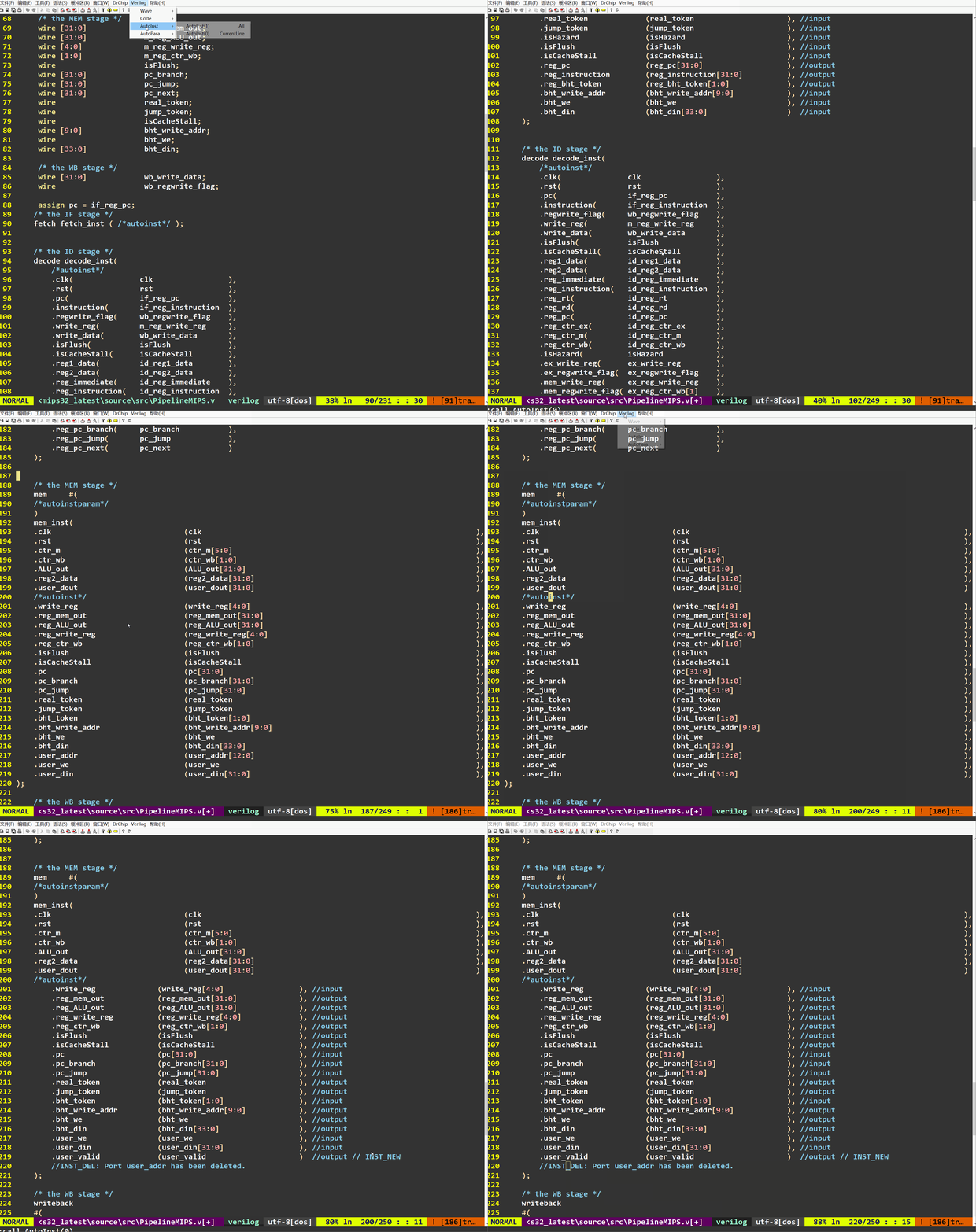
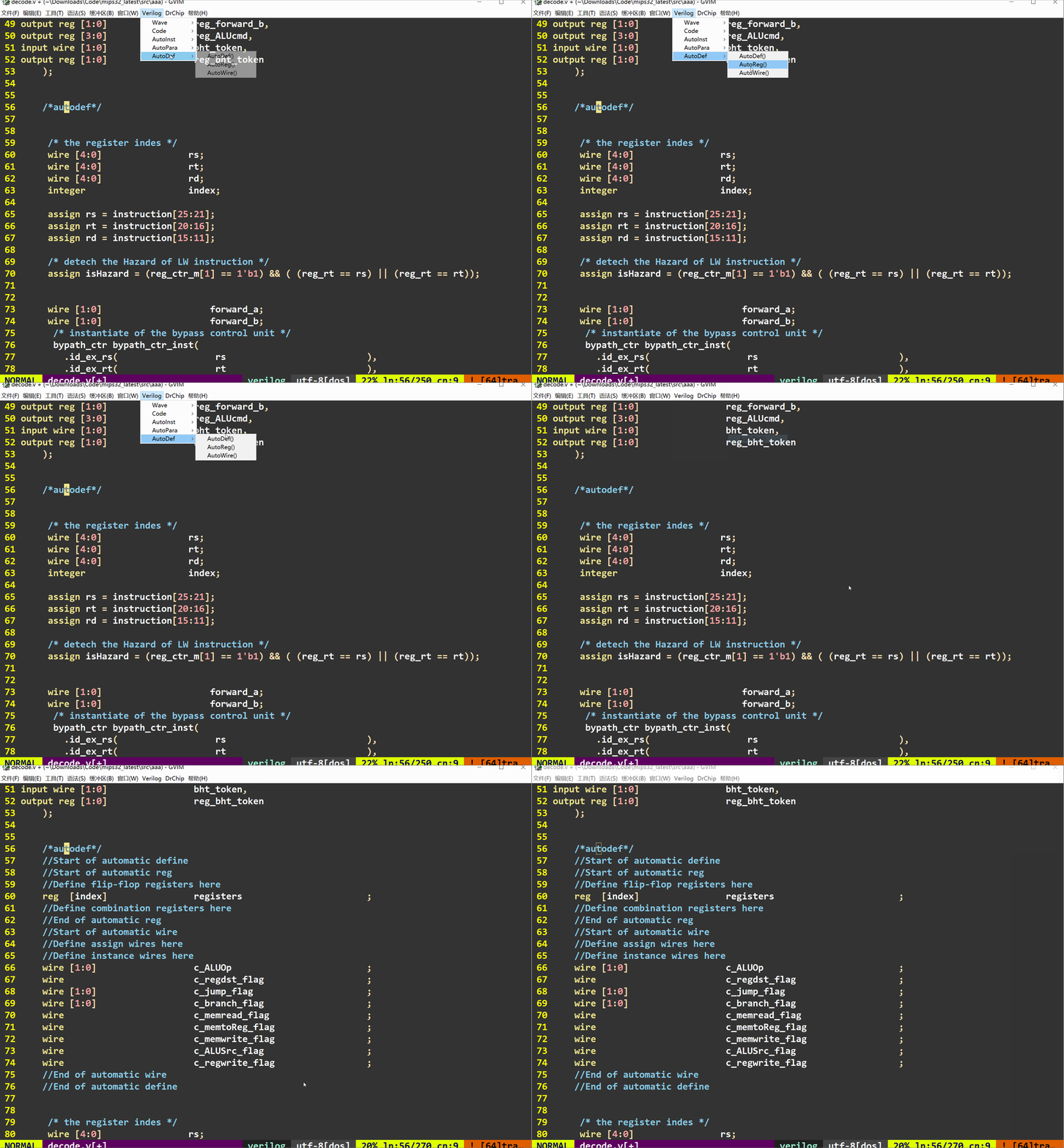
automatic

该插件主要用于例化模块、寄存器和线网,但是在例化线网时,可能位宽会有些问题,需要自己注意一下
使用手册:automatic-verilog

1
2
3
4
5
6
7
8
9
10
11
12
13
14
15
16
17
"automatic
"\ati进行例化、\atd例化寄存器和线网
map \ati :call g:AutoParaValue(0)<Esc>:call g:AutoInst(0)<Esc>
map \atw :call g:AutoDef()<Esc>
let g:atu_autoinst_keep_chg = 1 " 修改过的连线保留不刷新
let g:atv_autoinst_incl_width = 0 " 不添加多bit位宽
let g:atv_autoinst_incl_cmnt = 0 " 不添加//注释
"对齐位置
let g:atv_autopara_st_pos = 0 " 参数起始位置
let g:atv_autopara_name_pos = 40 " 参数左括号对齐位置
let g:atv_autopara_sym_pos = 71 " 参数右括号对齐位置
let g:atv_autoinst_st_pos = 0 " 信号起始位置
let g:atv_autoinst_name_pos = 40 " 信号左括号对齐位置
let g:atv_autoinst_sym_pos = 71 " 信号右括号对齐位置
let g:atv_autodef_st_pos = 0 " Reg&Wire起始位置
let g:atv_autodef_name_pos = 52 " Reg&Wire名称对齐位置
let g:atv_autodef_sym_pos = 72 " Reg&Wire分号对齐位置

550
550

ultisnips

该插件是将自己写的代码片段定义为某个关键词,通过这种方式缩短重复编写代码

1
2
3
4
5
"UltiSnip
let g:UltiSnipsSnippetDirectories = ["D:/gvim/Vim/vim_plugin/vim-snippets"]
let g:UltiSnipsExpandTrigger="<tab>"
let g:UltiSnipsJumpForwardTrigger="<c-j>"
let g:UltiSnipsJumpBackwardTrigger="<c-k>"

下面为我自己使用的代码片段

1
2
3
4
5
6
7
8
9
10
11
12
13
14
15
16
17
18
19
20
21
22
23
24
25
26
27
28
29
30
31
32
33
34
35
36
37
38
39
40
41
42
43
44
45
46
47
48
49
50
51
52
53
54
55
56
57
58
59
60
61
62
63
64
65
66
67
68
69
70
71
72
73
74
75
76
77
78
79
80
81
82
83
84
85
86
87
88
89
90
91
92
93
94
95
96
97
98
99
100
101
102
103
104
105
106
107
108
109
110
111
112
113
114
115
116
117
118
119
120
121
122
123
124
125
126
127
128
129
130
131
132
133
134
135
136
snippet	always "always @(posedge clk) begin"
always @(posedge clk) begin
if(${1:rst == 1'b1}) begin

end else if(${2:xxx == 32'h0}) begin

end else begin

end
end
endsnippet


snippet inst "// Instance: ./xxx.v"
// Instance: ./xxx.v
${1:XXX}#(
/*autoinstparam_value*/
)U_${2:XXX}(
/*autoinst*/
);
endsnippet


snippet module "module XXX #("
/////////////////////////////////////////////////////////////////////////
// Company: <Company Name>
// Module Name: <Module Name>
// Create Date: `!v strftime("%Y-%m-%d")`
// Author: winki
//
// Description:
//
// ----------------------------------------------------------------------
// Modification History:
// Data Version By Description
// ----------------------------------------------------------------------
// `!v strftime("%Y-%m-%d")` 1.0 winki Init version
//
/////////////////////////////////////////////////////////////////////////

module xxx #(
parameter ADDR_WIDTH = 14 ,
parameter DATA_WIDTH = 14
)(
// Clock and Reset
input wire clk ,
input wire rst ,
// Interface
input wire xxx ,
input wire xxx ,
input wire [ADDR_WIDTH -1:0] xxx ,
input wire [DATA_WIDTH -1:0] xxx ,
output wire [DATA_WIDTH -1:0] xxx ,
output wire [DATA_WIDTH -1:0] xxx
);

//=======================================================================
//
// Localparam
//
//=======================================================================
localparam COUNT = xx ;


//=======================================================================
//
// Signal
//
//=======================================================================
wire [ADDR_WIDTH -1:0] xxx ;
/*autodef*/


//=======================================================================
//
// Process
//
//=======================================================================
always @(posedge clk) begin
if(rst == 1'b1) begin

end else begin

end
end


endmodule

endsnippet


snippet generate "generate for(i=0;i<N;i=i+1) begin"
genvar i
generate for(i=0;i<N;i=i+1) begin



end endgenerate
endsnippet


snippet case "case(xxx)"
case(xxxx)
12'h000:xxx <= xxx;
12'h000:xxx <= xxx;
12'h000:xxx <= xxx;
12'h000:xxx <= xxx;
12'h000:xxx <= xxx;
12'h000:xxx <= xxx;
12'h000:xxx <= xxx;
default:xxx <= xxx;
endcase
endsnippet


snippet ==== "===================="
//=======================================================================
//
// Big Box
//
//=======================================================================
endsnippet


报错

  1. 如果显示'git' executable was found 就在设置—系统—关于—高级系统设置—高级—环境变量—path—编辑—新建添加Git的环境变量
  2. 如果看到^M,就设置:set ff=unix